SEO for ecommerce is the work of getting an online store's category and product pages to rank in search results for the searches shoppers make before they buy. It covers keyword research, a clear site structure, unique product and category content, technical health such as speed, crawlable URLs and structured data, and links from other sites. The same work now decides whether AI Overviews and shopping assistants like ChatGPT show your products.
TL;DR
- Map one search to one page. Category pages target category searches ("women's trail running shoes"), product pages target specific products. Two pages chasing the same search can split your signals, so pick one primary URL.
- Make every product reachable through links. Google says it's "strongly recommended to link to all products that you wish indexed," starting from the home page and category pages.
- Keep filters from multiplying your URLs. For filter URLs you don't need in search, Google's advice is: "Use robots.txt to disallow crawling of faceted navigation URLs."
- Write your own product and category copy. Manufacturer descriptions are the same on every store that sells the product, and Google asks whether content gives "a substantial, complete, or comprehensive description of the topic."
- The same work counts in AI search. Google says there are "no additional requirements to appear in AI Overviews or AI Mode," and that Merchant Center feeds help products show in AI responses. ChatGPT draws on "structured metadata from first-party and third-party providers."
- Measure both channels. Search Console now has a generative AI performance report for Google, but no tool from Google shows whether ChatGPT or Perplexity recommends your products.
What is SEO for ecommerce?
SEO for ecommerce, also called ecommerce SEO, is search engine optimization for online stores. Its goal is to bring shoppers from search engines to the pages where they can buy: category pages for broad searches and product pages for specific ones.
It differs from SEO for a blog or a service business in three ways. A store has hundreds or thousands of pages that look alike. Many of its most valuable searches are commercial, from people comparing products. And much of the content, such as prices, stock and variants, changes every day.
Why is SEO important for ecommerce?
Organic search brings shoppers who are already looking for what you sell, and you don't pay for each visit the way you do with ads. A category page that ranks keeps bringing traffic after the work is done, while paid traffic stops when the budget does.
There is a second reason in 2026. Search engines and AI assistants increasingly answer shopping questions directly. The pages and product data that rank in Google are also what those answers draw on. A store that is invisible to search is often invisible in AI answers too.
How to do SEO for an ecommerce website
The order matters more than any single tactic. Work through it in this sequence:
- Research keywords and decide which page targets which search.
- Structure the site so every category and product is reachable through links.
- Optimize category pages, then product pages.
- Fix technical issues: duplicate URLs, filters, speed, structured data and sitemaps.
- Create content that answers questions shoppers ask before buying.
- Earn links from relevant sites.
- Measure in Google and in AI answers, and repeat.
Each step is covered below.
Keyword research for online stores
Ecommerce keyword research is about finding the searches people make when they are close to buying, and assigning each one to the page that should rank for it.
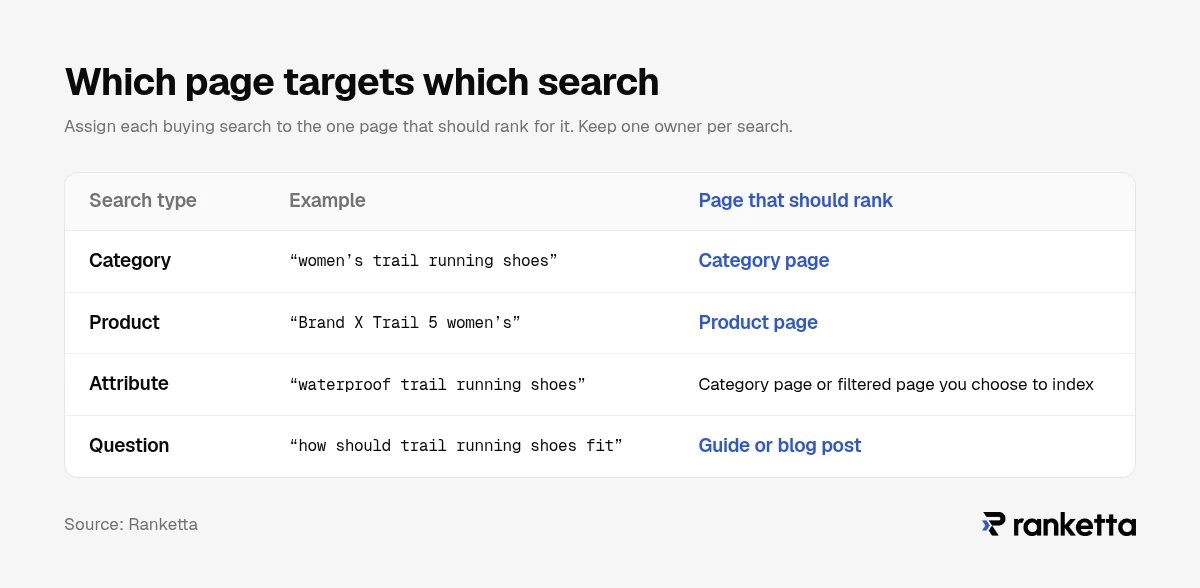
Group searches by intent:
| Search type | Example | Page that should rank |
|---|---|---|
| Category | "women's trail running shoes" | Category page |
| Product | "Brand X Trail 5 women's" | Product page |
| Attribute | "waterproof trail running shoes" | Category page or filtered page you choose to index |
| Question | "how should trail running shoes fit" | Guide or blog post |
Three habits make the difference:
- Use your customers' words. Search Console queries, on-site search terms and review text show how shoppers actually describe products.
- Check what already ranks. If Google shows category pages for a search, a product page rarely wins it, and the other way round.
- Keep one owner per search. Write down which URL targets each keyword. Two pages competing for the same search can split their signals.
Site architecture and category pages
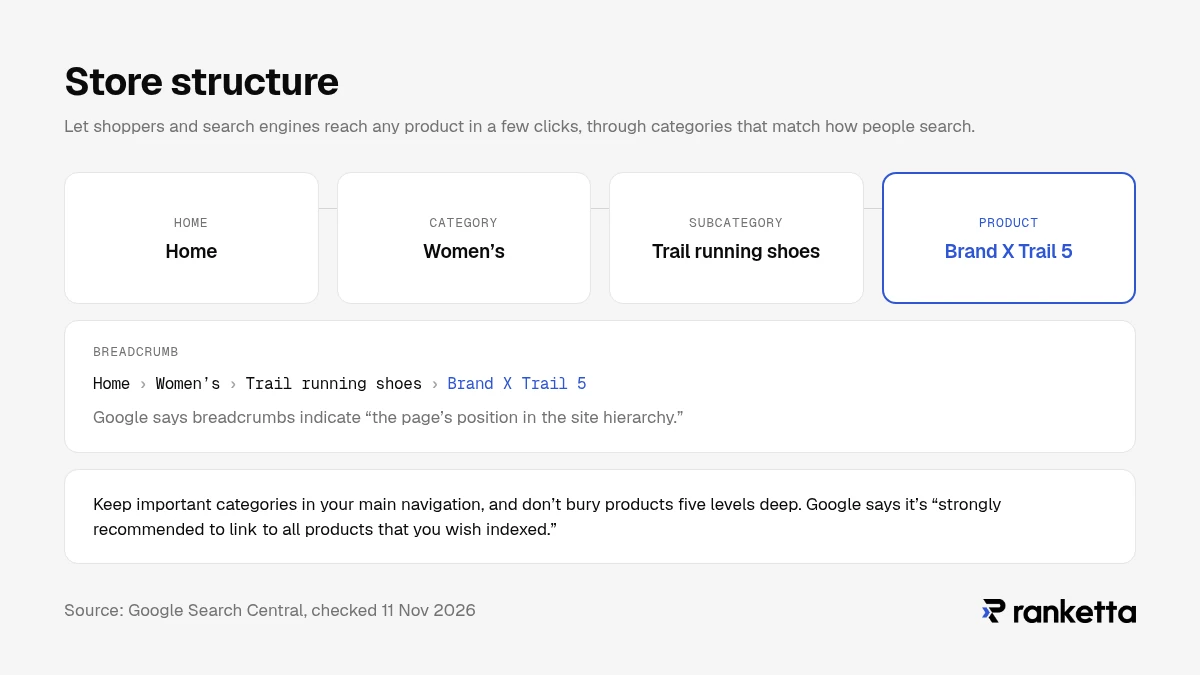
A good ecommerce site structure lets shoppers and search engines reach any product in a few clicks, through categories that match how people search.
Google's ecommerce documentation says it's "strongly recommended to link to all products that you wish indexed," and suggests linking important pages "from the home page or in other content, such as blog posts or newsletters on your site." It also notes that Google "can use information such as the number of links it needs to follow to reach a page" to judge how important that page is. In practice: keep important categories in your main navigation, and don't bury products five levels deep.
Category pages are usually the most valuable pages in a store, because they match the broad searches with the most volume. Give each one:
- a unique page title and meta description that use the category search term
- a short introduction that says what the category contains and who it is for
- links to subcategories and best-selling products
- breadcrumbs, which Google says indicate "the page's position in the site hierarchy"
If a category has no products, Google's guidance is clear: "If a category has no items, use a noindex robots meta tag," or consider returning a 404.
Faceted navigation and filters
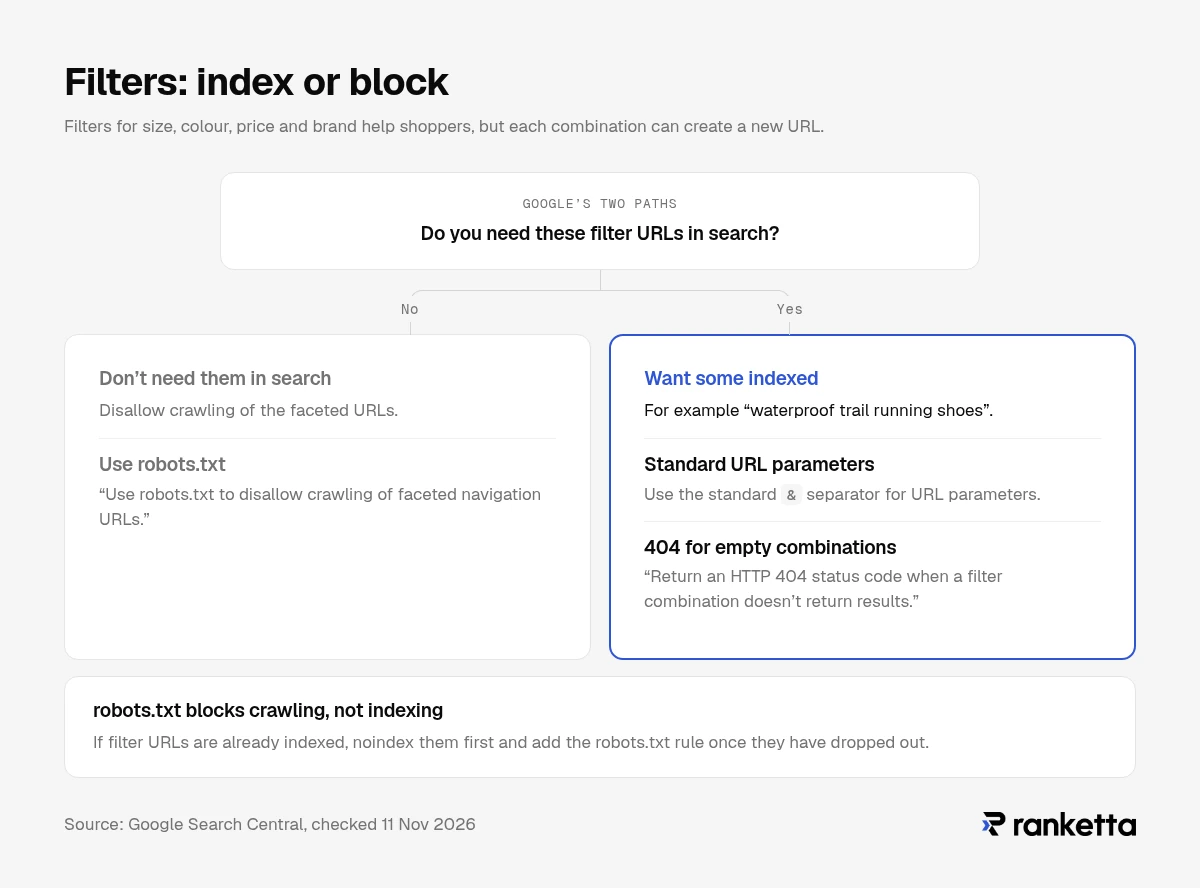
Filters for size, colour, price and brand help shoppers, but each combination can create a new URL. A store with a few filters can end up with millions of near-identical pages that waste Google's crawling.
Google's faceted navigation documentation gives two paths:
- If you don't need filtered pages in search: "Use robots.txt to disallow crawling of faceted navigation URLs."
- If you do want some indexed (for example "waterproof trail running shoes"): use the standard
&separator for URL parameters, and "Return an HTTP 404 status code when a filter combination doesn't return results."
Choose deliberately which filter combinations deserve to rank, usually the ones with real search demand, and stop Google crawling the rest. robots.txt blocks crawling, not indexing: if filter URLs are already indexed, noindex them first and add the robots.txt rule once they have dropped out.
Product page SEO
Product pages win specific searches: brand names, model numbers and detailed queries. Each one needs:
- A descriptive title: brand, product type and the attribute people search for.
- Your own description. Copy from the manufacturer appears on every store that sells the product. Answer what buyers ask: what it's for, who it suits, materials, sizing, what's in the box.
- Image alt text that describes the product and variant.
- Product structured data. Google recommends that you "Include structured data in your site's product pages," which makes price, availability and reviews eligible to show in results.
- Real reviews, which add the detail and language shoppers use.
- Accurate stock status. Keep out-of-stock pages live and marked as out of stock rather than deleting them.
If your store runs on Shopify, our Shopify SEO checklist covers each of these step by step in the Shopify admin.
Technical SEO for ecommerce sites
Technical SEO makes sure search engines can crawl your catalog, understand which URL is the main version of each page, and load pages quickly.
- Duplicate URLs. The same product often appears under several URLs, through categories, filters or tracking parameters. Google's guidance is to "Add a
<link>element in the code for all duplicate pages, pointing to the canonical page," and to "Minimize the number of alternative URLs that return the same content." - Clean URL parameters. Google recommends "?key=value URL parameters rather than ?value, where possible," and notes that it "does not use fragment identifiers in indexing," so content shown only at
#fragment URLs won't be indexed as separate pages. - XML sitemap. List the category and product pages you want indexed, and submit the sitemap in Google Search Console.
- Speed and stability. Google's Core Web Vitals thresholds for a good experience are LCP within 2.5 seconds, INP of 200 milliseconds or less, and CLS of 0.1 or less.
- Structured data. Product markup on product pages, breadcrumb markup across the site.
Content and link building for online stores
Content earns a place on a store when it answers questions shoppers ask before choosing: sizing guides, comparisons, "how to choose" articles and care instructions. Each piece should link to the category or products it helps sell. One of Google's self-assessment questions asks whether content provides "a substantial, complete, or comprehensive description of the topic."
Links from other sites still help category and product pages rank. Realistic sources for a store include brands and suppliers you stock, industry publications, gift guides, local press, partners and review sites in your category. A few links from relevant sites are worth more than many from directories.
How ecommerce SEO works in AI search
AI search doesn't replace ecommerce SEO. It reuses the same pages and product data, and adds new places where your products can appear or be left out.
Google AI Overviews and AI Mode. Google says: "There are no additional requirements to appear in AI Overviews or AI Mode, nor other special optimizations necessary." Its guide to generative AI features adds that "You don't need to create new machine readable files, AI text files, markup, or Markdown," and that Merchant Center feeds "can help your products and services to be visible in both AI responses and other Google Search results." For a store, that makes a clean Merchant Center feed part of SEO, not only of Shopping ads.
ChatGPT and other assistants. OpenAI says ChatGPT's product results "are selected independently by ChatGPT and are not ads," and lists "structured metadata from first-party and third-party providers" among what ChatGPT considers. ChatGPT also shows ads, kept separate from these results. Stores can supply product data through a feed, and OpenAI's merchant page says Shopify and Etsy catalogs are already integrated. We explain the options in ChatGPT product feeds.
The practical consequence: product titles, descriptions, attributes and identifiers now do double duty. The same fields that help a product page rank in Google also affect whether an AI assistant can match your product to a shopper's question. Our guide to structuring product data for AI search goes into the detail, and AI search optimization best practices covers what the evidence says about crawlers, schema and llms.txt.
How to measure ecommerce SEO and AI visibility
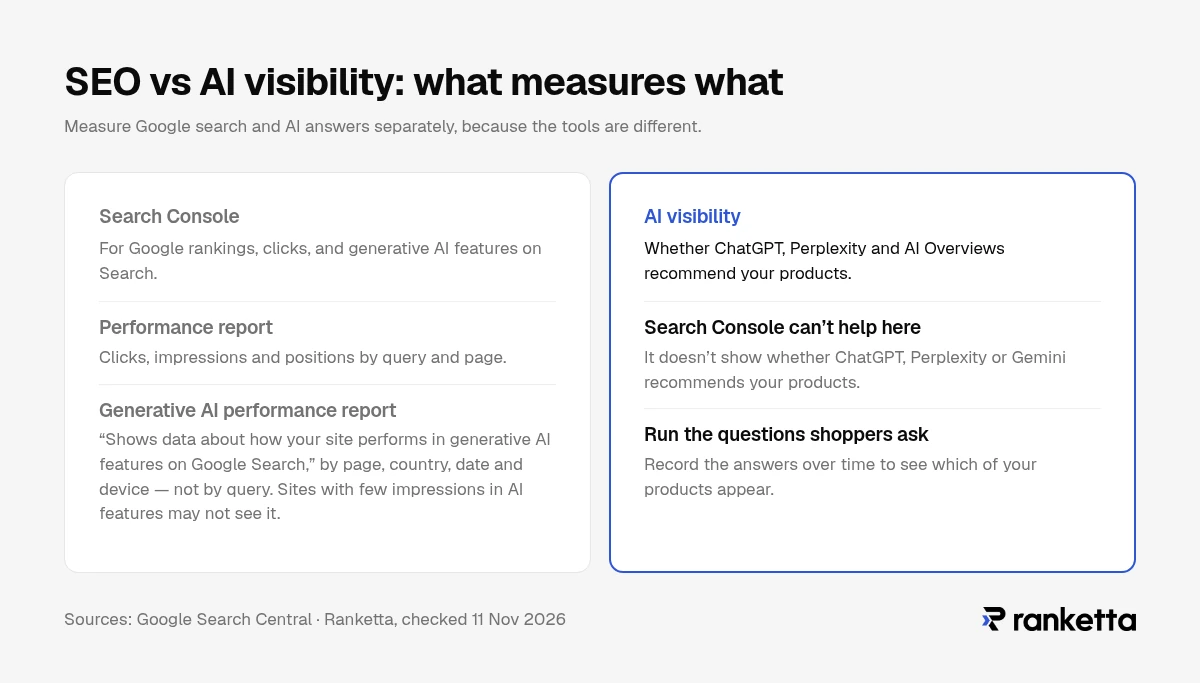
Measure Google search and AI answers separately, because the tools are different.
For Google, Search Console's Performance report shows clicks, impressions and positions by query and page. Google also added a generative AI performance report, which "shows data about how your site performs in generative AI features on Google Search," broken down by page, country, date and device, but not by query. Sites with few impressions in AI features may not see it.
For AI assistants such as ChatGPT, Perplexity and Gemini, Search Console can't help. To know whether they recommend your products, you have to run the questions shoppers ask and record the answers over time.
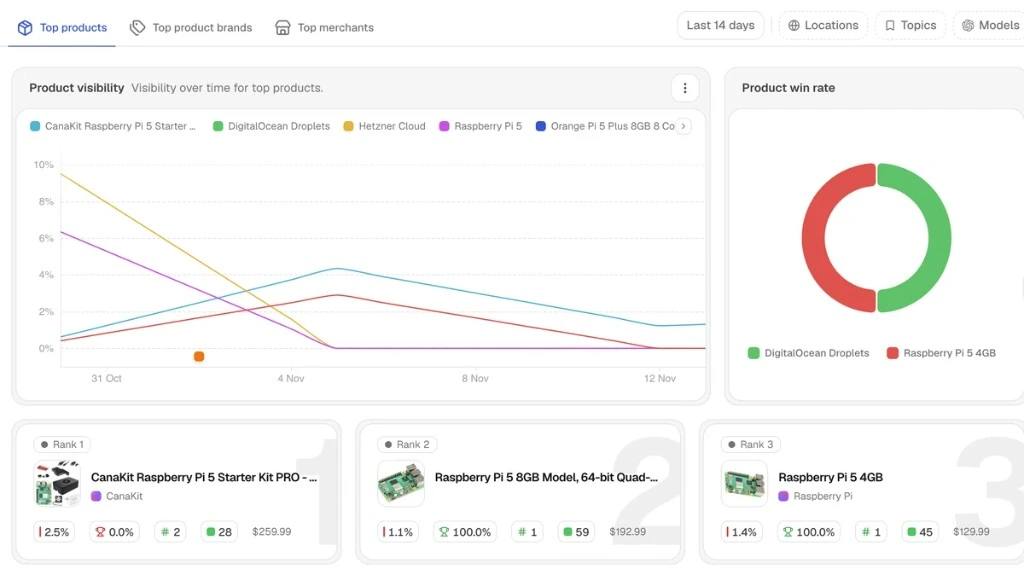
That second part is what Ranketta does:
- Track which of your products appear in AI answers across ChatGPT, Perplexity and Google AI Overviews.
- Fix product data: an AI agent proposes rewrites of titles, descriptions and attributes, with a confidence score on every change, and you approve or reject each one.
- Ship approved changes back to Shopify, or for other stores to Google Merchant Center as a supplemental feed.
Common ecommerce SEO mistakes
- Using manufacturer descriptions on every product. The same text exists on every store selling that item.
- Letting filters create millions of URLs. Crawling gets wasted on near-duplicates instead of the pages that matter.
- Two pages targeting the same search. A category page and a blog post competing for one keyword can split signals; decide which one is the primary page.
- Deleting out-of-stock products. Temporarily unavailable products should stay live and be marked out of stock. For products gone for good, redirect to a close alternative, or return 404 or 410 if there isn't one.
- Leaving empty categories indexed. Noindex or remove them.
- Ignoring the Merchant Center feed. Google now names it as one way products become visible in AI responses.
- Measuring only Google. Rankings can look healthy while AI assistants recommend a competitor.
What to do next
- This week: write down which URL targets each of your 20 most important searches, and fix any duplicates.
- This week: check that every product is linked from at least one category page.
- This month: add introductions, page titles and meta descriptions to your main category pages.
- This month: rewrite descriptions for your best-selling products in your own words.
- This month: decide which filter combinations deserve to be indexed and stop Google crawling the rest.
- Ongoing: keep your Merchant Center feed complete and accurate, and earn links from relevant sites.
- Then: check whether AI assistants recommend your products for the questions your customers ask. Run a free AI visibility audit.
How we verified this
Every statement about what Google recommends was checked against Google Search Central documentation and Search Console help on 11 November 2026, and every statement about ChatGPT against OpenAI's help center on the same day. Survey figures are labelled with their publication date.
Frequently asked questions
Sources
- Google Search Central, Designing a URL structure for ecommerce sites, updated 10 December 2025
- Google Search Central, Help Google understand your ecommerce site structure, updated 10 December 2025
- Google Search Central, Managing crawling of faceted navigation URLs, updated 18 December 2025
- Google Search Central, Breadcrumb structured data, updated 8 September 2026
- Google Search Central, Share your product data with Google, updated 10 December 2025
- Google Search Central, How to specify a canonical URL, updated 10 July 2026
- Google Search Central, Creating helpful, reliable, people-first content, updated 5 October 2026
- Google Search Central, SEO Starter Guide, updated 10 December 2025
- Google Search Central, AI features and your website, updated 10 December 2025
- Google Search Central, Google's guide to optimizing for generative AI features, updated 10 July 2026
- Google Search Console Help, Generative AI performance report, accessed 11 November 2026
- web.dev, Web Vitals, updated 31 October 2024
- OpenAI Help Center, Shopping in ChatGPT, accessed 11 November 2026
- OpenAI, ChatGPT merchants, accessed 11 November 2026
- Ahrefs, SEO pricing survey, last updated 15 August 2024