A ChatGPT product feed is a file of your product catalog, built to OpenAI's specification, that lets ChatGPT show your products in its shopping results with current prices, availability and links. Each row is one item, with nine core fields including title, price and availability. Shopify and Etsy catalogs are included automatically; other stores apply at chatgpt.com/merchants. A separate feed in ChatGPT Ads Manager only powers ads during the current beta.
TL;DR
- Selling on Shopify or Etsy? You don't need to submit a feed. OpenAI says your catalog is "already integrated". Your work is the product data in Shopify: titles, attributes and identifiers.
- Everyone else applies at chatgpt.com/merchants and sends the feed over SFTP or the API. For SFTP files, OpenAI recommends a full snapshot at least daily, and a missing or unrecognised
availabilityvalue rejects the row. - Don't upload to Ads Manager to get organic visibility. As of 4 November 2026, OpenAI says those products "will not appear in organic ChatGPT conversations" during the beta.
- If you run ChatGPT ads, automate the ads feed. Items expire after two weeks, and a partial file sent with
is_full_refresh: truedeletes the missing products within a day. - Add
utm_medium=feedto every product URL in your feed. ChatGPT doesn't tag feed clicks for you, so without it you can't tell feed traffic from other ChatGPT referrals.
What is a ChatGPT product feed?
A ChatGPT product feed is a machine-readable list of the products you sell, with one row per item: an ID, a title, a description, a price, availability, an image and a link to the product page. OpenAI reads it so ChatGPT can show your products with current prices and stock, instead of piecing them together from crawled web pages.
The confusion starts because "ChatGPT product feed" now refers to two separate things, with separate owners inside OpenAI, separate specs and separate outcomes:
- The commerce feed (OpenAI calls the programme "ChatGPT merchants"). It makes your products eligible for the shopping results ChatGPT shows when someone asks for a product. These results are free and organic.
- The ads feed (inside ChatGPT Ads Manager). It lets you build Shopping-style ad campaigns from your catalog. Trade press first reported feed-based campaigns in June 2026.
They share the same base product schema, but they go in through different doors and produce different results. Most of what goes wrong with ChatGPT feeds comes from treating the two doors as one.
How ChatGPT chooses which products to show
Before choosing a feed, it helps to know what ChatGPT does with one.
OpenAI's help article on shopping, updated in early November 2026, says product results "are selected independently by ChatGPT and are not ads, nor influenced by any OpenAI partnerships." It lists what the model weighs: the query and conversation context, "available options, price, reviews, and ease of use," and "structured metadata from first-party and third-party providers." When several merchants sell the same product, they are "ranked based on factors like availability, price, quality," and also by whether they are the maker or primary seller of the item.
Two practical consequences:
- The feed is the first-party structured metadata. Without one, ChatGPT relies on what third parties say about your product.
- Reviews come from the open web. OpenAI says review summaries are "based on reviews from public websites." A feed can't supply them.
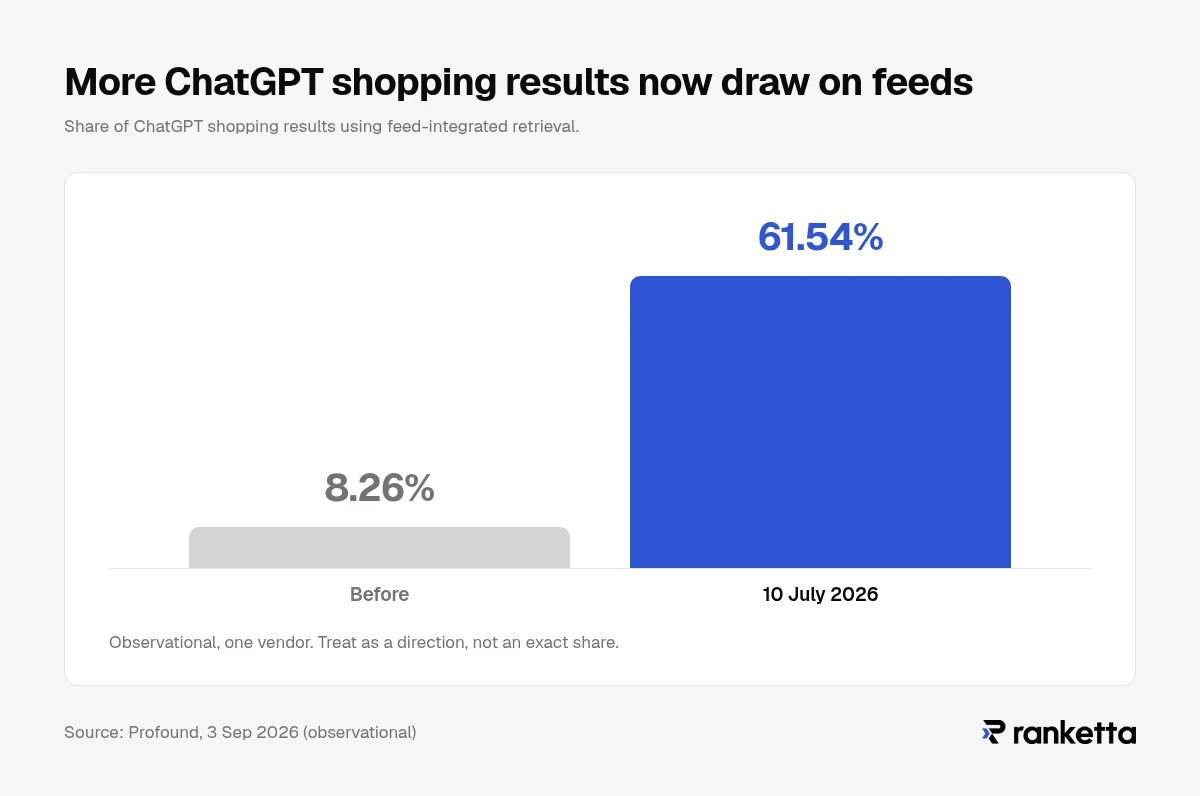
Feeds also matter more each month. Profound looked at how ChatGPT retrieves products and reported that results drawing on integrated feeds rose from 8.26% to 61.54% on 10 July 2026. This is one vendor's observational analysis, and the write-up gives the date and the share slightly differently in different places, so treat 61.54% as a direction rather than an exact share. The direction is clear, though: getting into ChatGPT shopping increasingly depends on a feed rather than on being crawled.
The two ChatGPT feeds, side by side
This table is the core of the article. Everything else is detail.
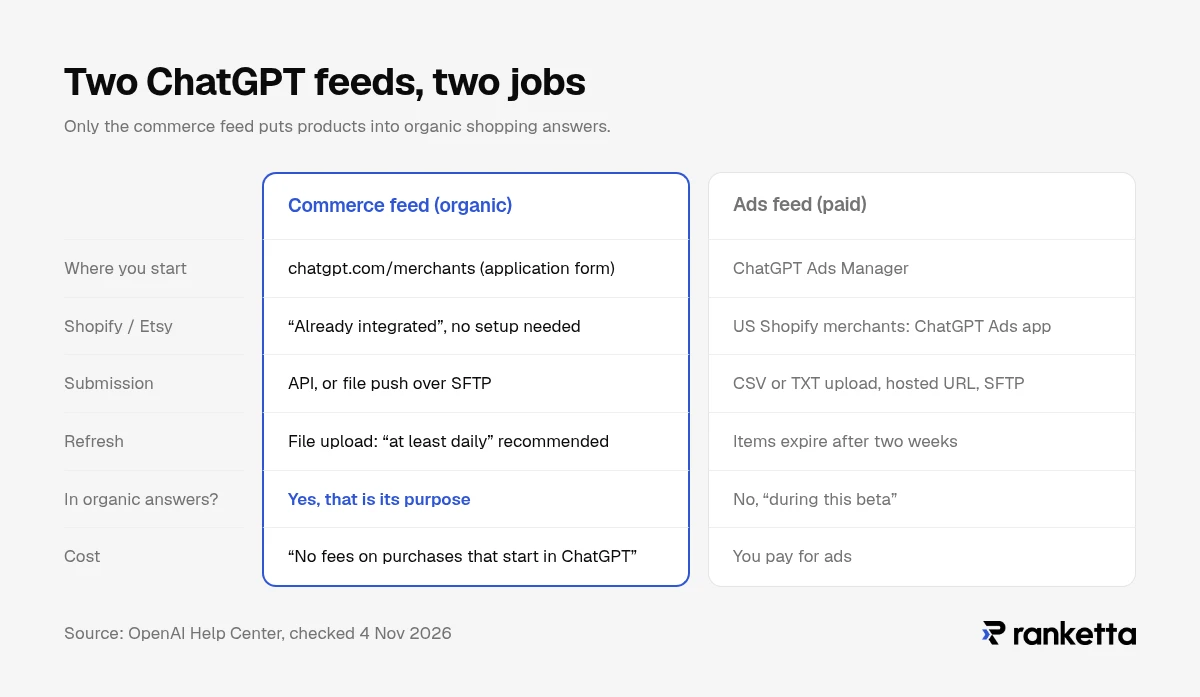
| Commerce feed (organic) | Ads feed (paid) | |
|---|---|---|
| What it does | Makes products eligible for ChatGPT's organic shopping results | Builds ad campaigns from your catalog |
| Where you start | chatgpt.com/merchants (application form) | ChatGPT Ads Manager |
| Shopify / Etsy | "Already integrated" – no setup needed | Shopify merchants in the US can use OpenAI's ChatGPT Ads app for Shopify |
| Spec | developers.openai.com/commerce (API or file upload) | The same file-upload product schema, plus ads columns such as is_ads_eligible (developers.openai.com/ads/product-feeds) |
| Submission | API, or file push over SFTP | CSV or TXT upload, hosted URL, SFTP; Delta Feeds API for updates |
| Refresh | File upload: "at least daily" recommended | Items expire after two weeks |
| Shows up in organic answers? | Yes – that is its purpose | No, "during this beta" |
| Cost | "No fees on purchases that start in ChatGPT" | You pay for ads |
The row that matters most is the second-to-last. OpenAI's Ads help page says, word for word: "Products from your feed will only be eligible for use in ads during this beta. They will not appear in organic ChatGPT conversations, though we may offer that capability in the future." We last confirmed that sentence on 4 November 2026.
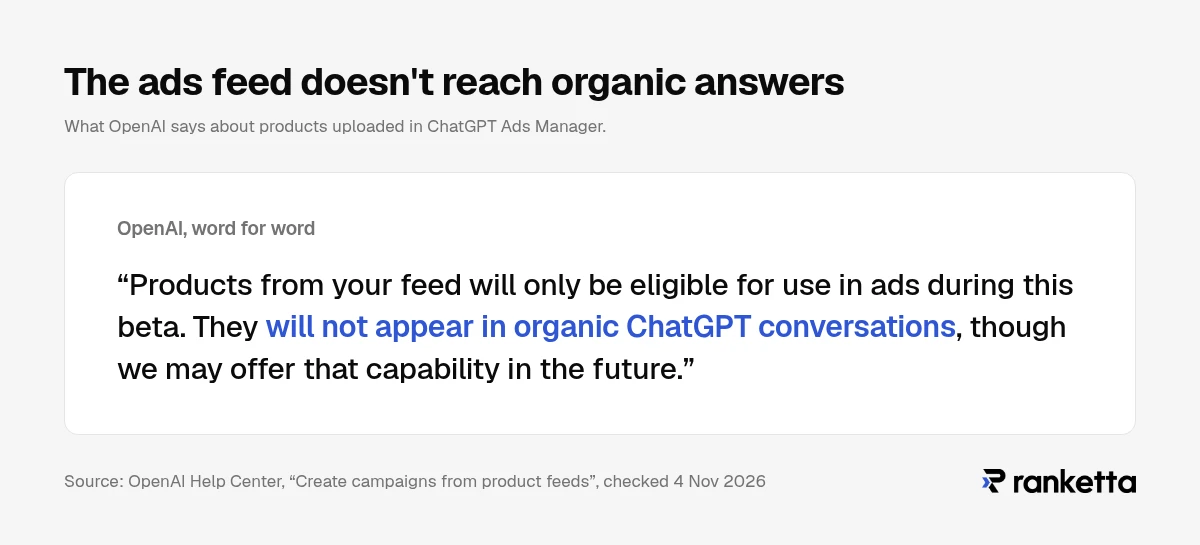
So if your goal is to appear when a shopper asks ChatGPT "best trail running shoes under $150", the Ads Manager upload is the wrong feed. You need the commerce feed. If you want both, you submit both.
Which feed do you need?
Answer three questions in order.
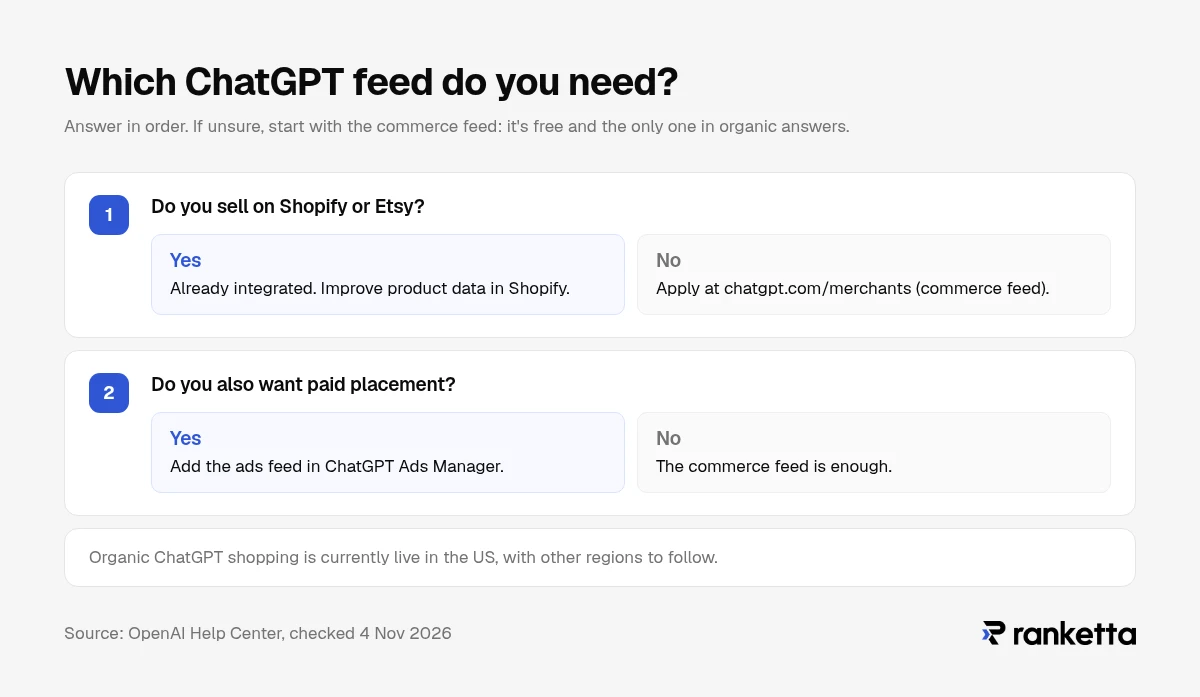
1. Do you sell on Shopify or Etsy? OpenAI's merchant page says: "If you sell through Shopify or Etsy, your catalog is already integrated, and no additional setup or application is required." Your job is to make the product data in Shopify good, not to build a second feed.
2. Are you on another platform and want organic visibility? Apply at chatgpt.com/merchants. The form asks for your feed size in SKUs and whether your feed is ready, and OpenAI says it supports "SFTP, APIs, and leading commerce platforms and feed providers." Shopping is currently live in the US, with other regions to follow "over time."
3. Do you also want paid placement? Then add the ads feed in Ads Manager. OpenAI said on 21 October 2026 that ChatGPT Ads is available in 89 countries, through technology partners or self-serve Ads Manager (self-serve is not available everywhere). We could not establish which of those markets support feed-based Shopping campaigns specifically, so check inside your Ads Manager account before planning a non-US launch.
If you are unsure, start with the commerce feed. It's free, and it's the only one that puts products into organic answers.
What goes into the commerce feed
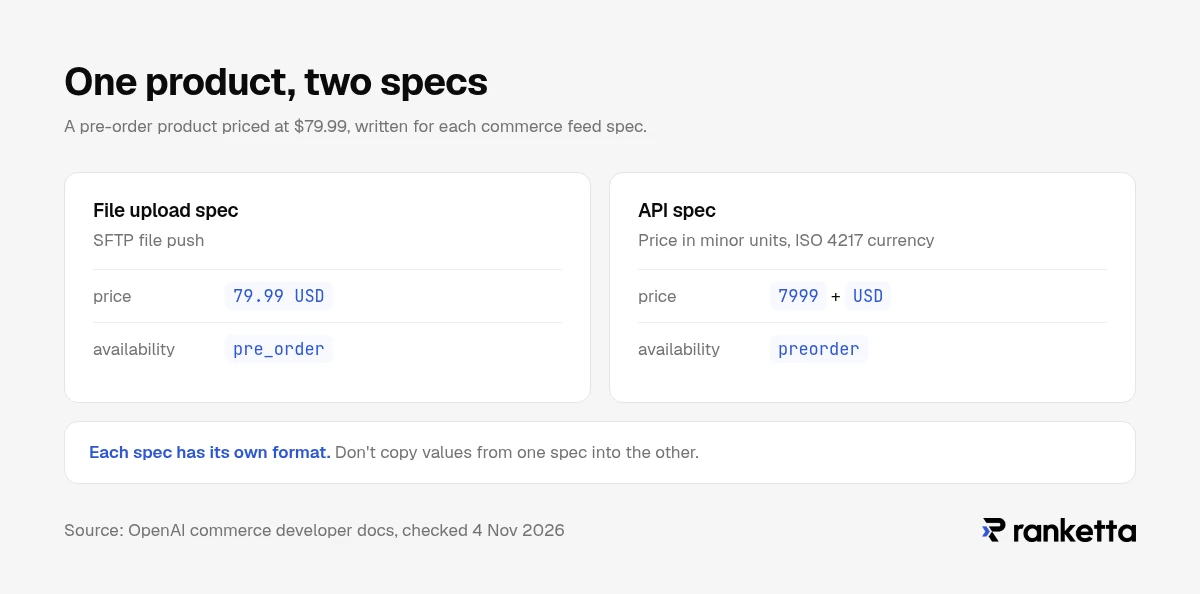
OpenAI publishes two specs for the commerce feed, and they are not interchangeable. Pick one route and follow its spec exactly.
The file-upload spec (SFTP)
This is the route most catalog teams will use. The spec lists nine fields as required for "a useful discovery feed":
| Field | What it holds | Watch out for |
|---|---|---|
item_id | Your unique ID for the item | Keep identifiers as strings so leading zeros survive |
title | Product name | Be specific: brand, model, key attribute |
description | Product description | Plain text, factual |
url | Product page | Add your own tracking parameters here |
brand | Brand name | |
seller_name | Your store's name | |
image_url | Main image | |
price | Price with currency | Written as 79.99 USD |
availability | Stock status | in_stock, out_of_stock, pre_order, backorder or unknown |
The availability rule is strict: "Omitted, empty, or unrecognized values reject the row." A feed exported from a system that writes preorder or InStock will lose those products without any visible error on the storefront.
Files go to OpenAI over SFTP. Parquet is the preferred format; jsonl.gz, csv.gz and tsv.gz are also accepted. OpenAI recommends sending a full snapshot "at least daily."
The API spec
The API route models products and variants separately: each product has an id and variants, and each variant has its own id and title. Two differences catch people moving from the file spec:
- Price is in minor units with an ISO 4217 currency code. $79.99 is
7999withUSD, not79.99 USD. - The first media item is the primary image. Order matters.
Its availability examples also differ slightly from the file spec (preorder, discontinued). Don't copy values from one spec into the other.
What is not in the spec
Some guides add header fields such as feed_id, account_id or target_merchant. We could not find those in OpenAI's current commerce specs, so we've left them out. If your onboarding contact asks for them, follow their instructions.
What goes into the ads feed
The ads feed reuses the commerce file-upload schema – OpenAI's ads docs say to "include every base field marked Required" in it – and adds ads-only columns. The fields are familiar; the failure modes are not.
- Intake: CSV or TXT upload, a hosted URL, or SFTP, with the Delta Feeds API for updating availability, titles and prices of existing variants between full uploads.
- Expiry: OpenAI's help page says "Items expire after 2 weeks," and recommends a hosted URL or automated SFTP for that reason.
- Eligibility default: OpenAI's help page says feeds created through Ads Manager make products ads-eligible by default unless an item is "explicitly marked false for ads eligibility." If you want to keep certain products out of ads (low margin, clearance), set
is_ads_eligibleto false on those rows. - Full refresh deletes: with
is_full_refresh: true, products missing from the file are removed within a day. A partial export sent as a full refresh will empty part of your catalog.
Since September, Ads Manager has added card-level reporting and bulk campaign creation, and shows product review status so you can see which items were rejected (reported by Search Engine Roundtable on 4 and 30 September 2026).
How to optimize your product feed for ChatGPT shopping results
Once the feed is accepted, the work becomes the same work that wins anywhere products get compared: give the model enough specific information to match your product to a specific request.
- Write titles that answer the query. "Men's trail running shoe, waterproof, size 10" matches more conversational requests than "Model X 2.0".
- Fill descriptions with attributes, not slogans. Material, dimensions, compatibility, use case. ChatGPT weighs "available options," and it can only weigh what is written down.
- Keep price and availability current. Price and availability are two of the factors OpenAI names for ordering merchants. Stale stock data costs you the comparison.
- Use real identifiers. Brand plus GTIN or MPN help ChatGPT recognise that your listing is the same product a review talks about.
- Look after your reviews off-site. Review summaries come from public websites, not your feed.
- Send the feed on schedule. Daily at minimum for the file route.
If you sell on Shopify, all six of these happen in your Shopify product data, because that is what OpenAI reads.
Don't neglect Google Merchant Center
It would be easy to read all this and conclude that Google's feed matters less now. It doesn't. Merchant Center is the feed behind Google's AI surfaces, and Google has added six conversational attributes for them: question_and_answer, document_link, related_product, item_group_title, variant_option and popularity_rank.
Google's help page says these attributes "help AI systems and conversational agents better understand your products' specific nuances," and that they help customers discover information about products on "AI-driven surfaces, like AI Mode in Search." They are "completely optional" and "won't impact the approval status" of your products. That is why most feeds don't have them yet, and why filling them in now gives you an advantage.
A ChatGPT feed and a Merchant Center feed can come from the same clean product data. Neither replaces the other.
How to tell whether your ChatGPT feed is working
A rejected or thin feed looks the same as a working one from your storefront. Measure it.
- Tag your feed URLs. OpenAI's best-practices guide: "Add feed attribution parameters to
url(for exampleutm_medium=feed) when you need feed-specific click tracking." ChatGPT doesn't add this for you, so if you skip it, feed clicks are mixed in with all other ChatGPT referrals. - Watch ChatGPT referrals in analytics. ChatGPT tags outbound links with
utm_source=chatgpt.com. The tags went missing for a stretch in October 2026, which OpenAI later called a bug, so check that they still arrive in your own GA4 before building reports on them. - For ads, check product review status in Ads Manager. Rejected items are listed there.
- Test the prompts your customers use. Ask ChatGPT what a buyer would ask, in the US, and see whether your product appears, at what price, and next to whom. Do it repeatedly: answers vary between runs.
How Ranketta helps
Ranketta covers the two things a feed can't do by itself: showing you where ChatGPT recommends you, and fixing the product data the feed carries.
- Track. Ranketta runs the shopping prompts you care about in ChatGPT and other AI assistants and shows which products appear, which competitors appear beside them, and which sources the answers cite.
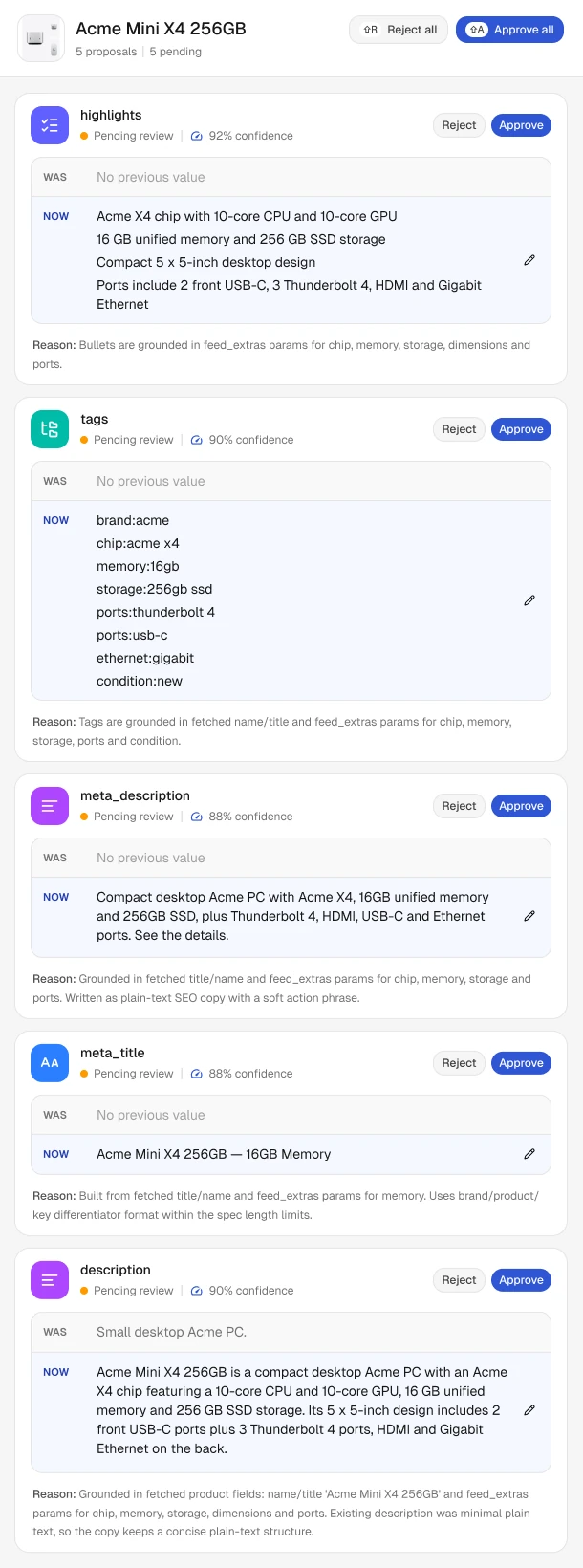
- Enrich. Ranketta's Merchandising agent proposes field-level improvements to titles, descriptions, highlights, tags and SEO meta fields, each with a confidence score from 0 to 100% and the reason behind it. You approve or reject each one. It never guesses a GTIN.
- Ship. On Shopify, approved changes write back to your products, including titles, descriptions, tags, category, GTIN/barcode and attributes. OpenAI says Shopify catalogs are already integrated with ChatGPT. On other platforms, Ranketta delivers the improved data to Google Merchant Center as a supplemental feed.
Ranketta takes Google Merchant or Amazon Marketplace XML feed URLs, the Shopify app or the Shoptet add-on as input. The Merchandising agent is available from the Starter plan at €79 a month.
Six ways merchants get the ChatGPT feed wrong
- Uploading to Ads Manager and expecting organic results. During the beta, that feed powers ads only.
- Applying when Shopify or Etsy already covers you. Fix the product data instead.
- Mixing the API spec and the file-upload spec.
7999in one,79.99 USDin the other;preorderin one,pre_orderin the other. - Sending ads feeds by hand. Items expire after two weeks. Use a hosted URL or SFTP.
- Sending a partial file as a full refresh. Missing products are deleted within a day.
- Never measuring. Untagged URLs and untested prompts mean a broken feed looks like a working one.
What to do next
- Decide which outcome you want, organic or paid, and submit the matching feed. For organic, that's the commerce feed via chatgpt.com/merchants, or your Shopify/Etsy catalog.
- Validate
availabilityagainst the exact allowed values before your first upload. That's the most common silent row rejection. - Add
utm_medium=feed(or your own convention) to every product URL in the feed this week. - If you run ChatGPT ads, switch manual uploads to a hosted URL or SFTP before the two-week expiry catches you.
- Fill Google's six conversational attributes in Merchant Center while you are fixing product data anyway.
- Test ten real shopping prompts in ChatGPT and record where you appear, so you have a baseline.
How we verified this
Every claim about what ChatGPT and its feeds do was checked against OpenAI's own documentation, help centre and merchant page on 4 November 2026: developers.openai.com/commerce (specs and best-practices guide), developers.openai.com/ads (product feeds and Delta Feeds), help.openai.com and chatgpt.com/merchants. Google's attributes were checked against Google Merchant Center Help on the same day. Dates and figures from third parties (Profound, PPC Land, Search Engine Roundtable) are attributed where used. This topic changes every few weeks, so we re-check this page every three to four weeks.
Want to know whether ChatGPT recommends your products today? Run a free AI visibility audit.
Frequently asked questions
Sources
- OpenAI Help Center, Create campaigns from product feeds, accessed 4 November 2026
- OpenAI Help Center, Shopping in ChatGPT, updated 4 November 2026
- OpenAI, ChatGPT merchants, accessed 4 November 2026
- OpenAI Developers, Commerce file upload: Products, accessed 4 November 2026
- OpenAI Developers, Commerce file upload: Overview, accessed 4 November 2026
- OpenAI Developers, Commerce API: Products, accessed 4 November 2026
- OpenAI Developers, Commerce best practices, accessed 4 November 2026
- OpenAI Developers, Ads product feeds, accessed 4 November 2026
- OpenAI Developers, Ads Delta Feeds, accessed 4 November 2026
- OpenAI, ChatGPT Ads expands to 26 new countries, 21 October 2026
- OpenAI Help Center, Set up ChatGPT Ads for Shopify, accessed 4 November 2026
- Profound, ChatGPT 5.6 shopping transformation, 3 September 2026
- Google Merchant Center Help, Conversational attributes, accessed 4 November 2026
- Search Engine Roundtable, ChatGPT Ads updates: card-level reporting, 4 September 2026
- Search Engine Roundtable, ChatGPT Ads updates: bulk creation and product review status, 30 September 2026
- PPC Land, ChatGPT Ads Manager now supports product feeds, 2 June 2026
- Search Engine Roundtable, UTM parameters missing from ChatGPT links, 14 October 2026