


Ranketta is built around a simple loop: measure, understand, act, then check whether what you did actually worked. Most of the value gets lost not in the measuring but in the step after it, when a number turns into a guess about what to do next. This guide walks through the loop in the order the product supports it.
One thing to know before you start: the measurement half of the loop is the same for everyone, but the action half depends on what you sell. If you're a brand, closing gaps mostly means fixing pages and publishing content, so Site Audit and Content Studio will be your home. If you run a store with its own catalogue, the biggest lever is usually the product data itself, which is what the Shopping module is for. The guide covers both paths and flags which is which, and plenty of stores end up using both, because product pages get cited too.
1. Set up for signal, not noise
Write prompts the way buyers talk. A prompt in Ranketta is a conversational question, the kind a real buyer types into ChatGPT. "What's the best CRM for marketing agencies under 50 people?" is a prompt. "CRM software" is a keyword, and keywords are not how people talk to AI.
Use Search Console to find prompts with real demand. There are three ways to create prompts. You can write them yourself, you can give Ranketta a keyword and let it generate prompt variations, or you can pull keywords straight from Google Search Console if you've connected it. The Search Console route is worth setting up early, because those keywords come with impression data attached. You see actual demand before you spend tracking capacity on a prompt, which beats guessing which questions matter. If you have a long list already, CSV import takes up to a thousand rows in one go.
Create a lot of them. That's Ranketta's own advice, and there's a reason behind it that shapes everything else in this guide: AI answers vary. The same prompt asked twice gives different results. Visibility only becomes a number you can trust when it's built from many repeated runs, so the more prompts you track, the more stable and complete your picture gets.
Get the competitor set right. Ranketta finds competitors automatically by watching who shows up in AI answers next to you, and you can add anyone it misses. One tip here: if two brands should really count as one, like a parent brand and its sub-brand, group them. Otherwise they split what's actually one competitor's share of voice into two smaller numbers, and the picture lies to you.
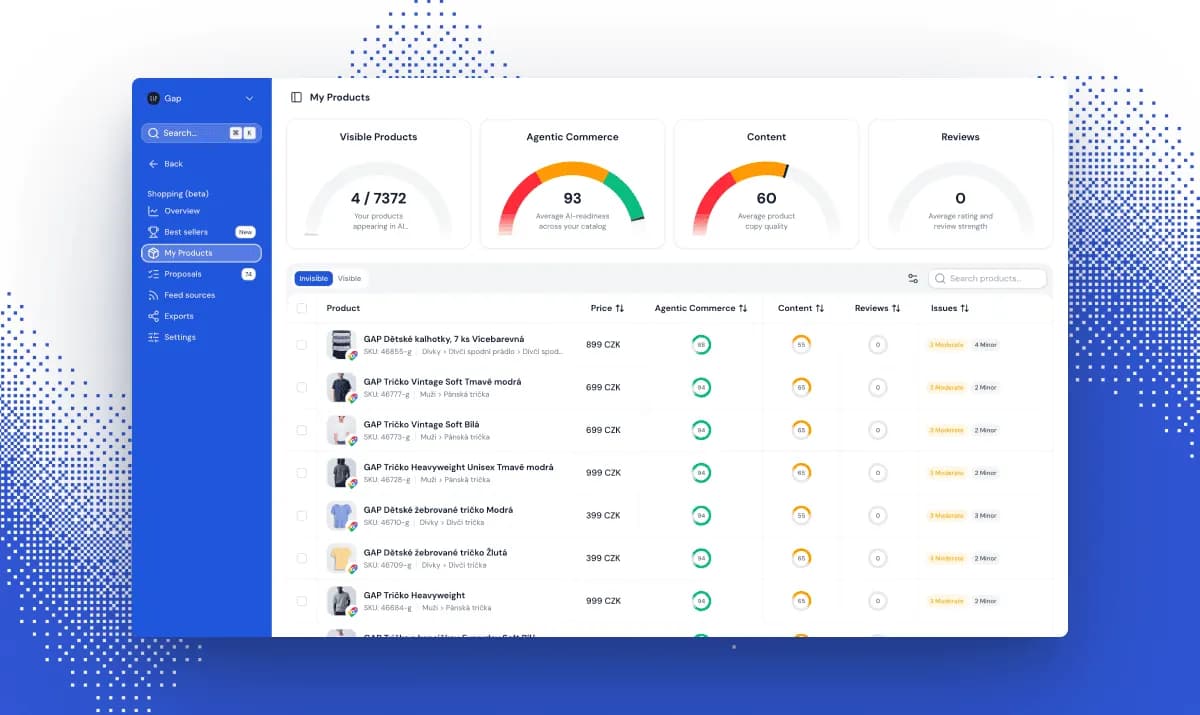
Stores: connect Google Merchant Center first. This is the setup step people skip and then wonder why half the Shopping section is empty. Top performers works right away because it only needs prompt tracking, so you'll immediately start tracking which product recommendations AI makes in your category. But My Products, Proposals, and Channels, the parts that handle product feed enrichment for your own catalogue, need at least one feed connected first. Start with GMC: most AI shopping assistants, including ChatGPT, Gemini, and Perplexity, pull product data from GMC feeds, not just Google's own surfaces, so that one connection improves how your products show up across AI answers generally.
2. How often to actually look
Weekly is the rhythm, and it's built in. You don't have to invent a review cadence, because the product has one. Opportunities arrive automatically every week: prompts where a competitor ranks and you don't, content that could earn better citations, gaps worth filling, sentiment issues worth a look. That weekly batch is your natural checkpoint. Go through it, mark items complete or reject them, and start with the ones that look high-impact and low-effort.
Daily checking mostly shows you noise. Two things about how the data gets collected explain why. First, visibility is a percentage built from many repeated runs, and that's what makes it accurate: Ranketta queries the actual web interface your customers use, not a vendor API that can return different answers than the real chat, and repeats each prompt until the percentage stabilizes. A single run means very little, and even asking ChatGPT yourself proves nothing either way; you might just catch a lucky answer, or an unlucky one. Second, change is gradual by nature. After you fix a page, AI platforms need to recrawl it and start citing it, and Ranketta needs to re-query the prompt enough times for the shift to show in your trend. What you'll see is a curve, not a jump, and refreshing the dashboard daily won't speed up the curve.
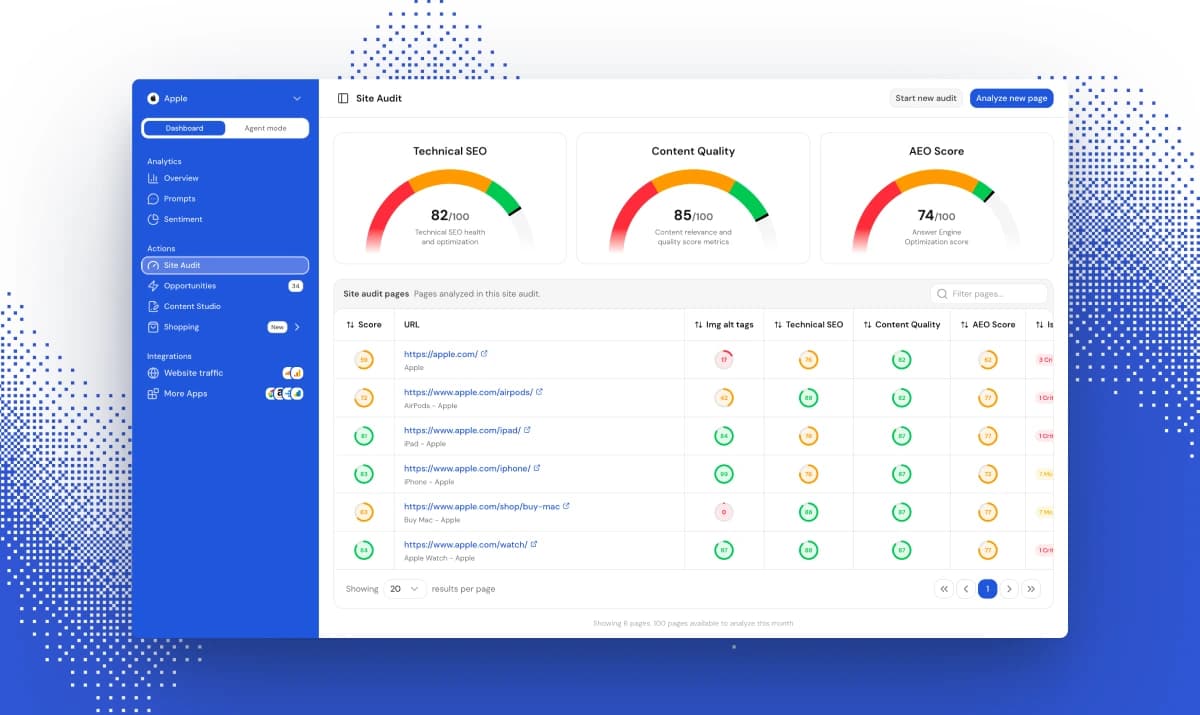
The one place instant feedback is real: Site Audit's "Analyze new page" scores a single URL on demand. Publish or edit a page, run it, and you know within minutes whether the fix landed. No full crawl needed.
3. Reading the numbers
Four metrics do most of the work, and each answers a different question.
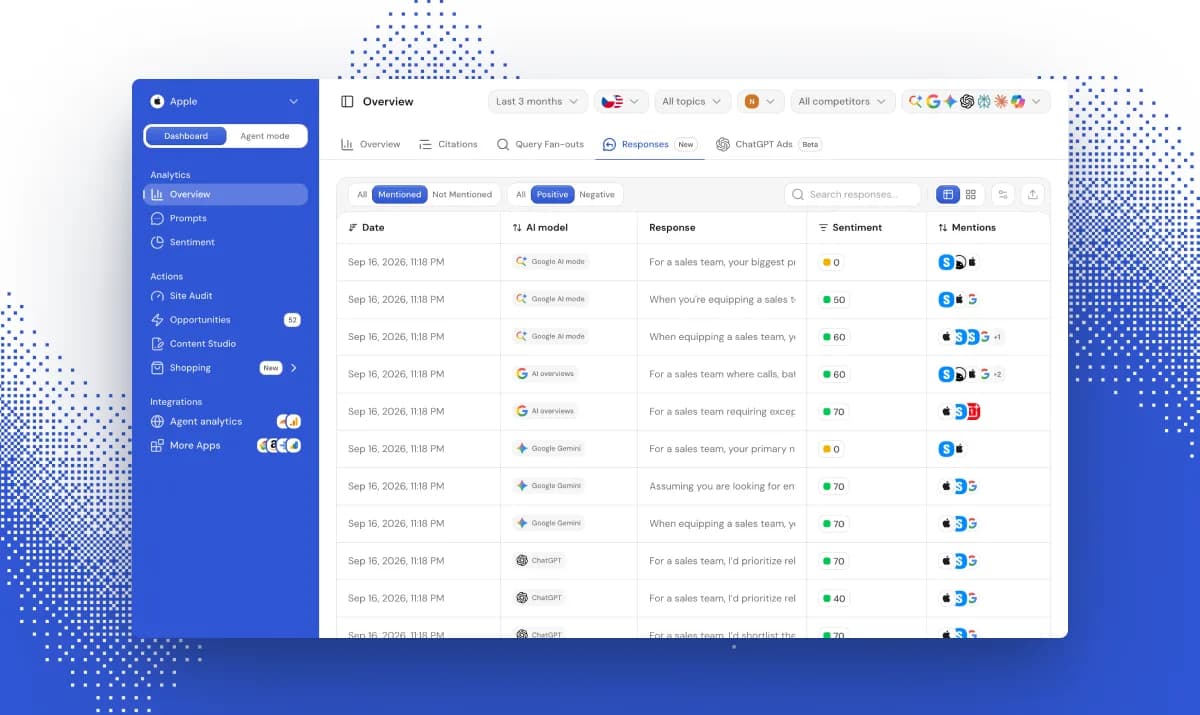
Visibility tells you how often you appear in AI answers at all. It's the floor metric, necessary but not sufficient. Look at it per platform, because each AI platform has its own sourcing habits and a gap between ChatGPT and Gemini is a finding, not a glitch.
Position tells you where you land when you do appear. This matters more than it would in classic search, because an AI answer isn't ten blue links to scan. It's a short list, and buyers build their shortlist from it.
Share of voice puts your presence next to your competitors'. It's the metric that catches a trap the other two miss: your visibility can rise while your share of voice falls, which means the category is growing faster than you are.
Sentiment tells you how AI talks about you when it mentions you. Treat it as an early warning system rather than a headline number.
Citations is where the numbers turn into a to-do list. Ranketta classifies every source AI cites by who publishes it (corporate site, forum, editorial, review hub, and so on) and by what kind of page it is (blog post, guide, listicle, comparison, product page, and more). Two numbers matter most here. Usage rate tells you how often a source gets cited, which is your share of the citation space. Mentioned tells you whether your brand was actually named in the answers that used it. Being cited is good. Being mentioned is better. The product tracks them separately for exactly that reason.
Query fan-out explains the confusing gaps. When AI answers your prompt, it usually runs several smaller searches internally, phrased differently than the prompt itself. Fan-out shows you those actual sub-queries per platform. This is often the story behind a platform gap that makes no sense at first: you can win the prompt as written and still lose the sub-query one particular model runs under the hood.
4. Where citations tend to come from
Before deciding what to fix, it helps to know what usually carries the weight. In accounts where the pattern is clear, citations sort into three tiers.
Owned content is usually the main engine. Blog articles, comparison pages, product pages, and the homepage tend to account for a bigger share of citations than all external sources combined. That's a different world from classic SEO, where off-site authority often dominates. Here, the highest-leverage work is usually on pages you already control.
Video plays a real but secondary role. It shows up in citations often enough to check, and it's an easy blind spot. A channel that AI already cites on your topics, without your brand appearing in it, is a specific and findable gap rather than a vague one.
Community and third-party sources are the smallest tier, but they punch above their weight. Forums, user discussions, and third-party comparison pages carry less total citation share, yet one well-placed mention on a source a model already trusts can matter more than its size suggests, because you're competing for a slot the model already visits.
So the practical order is: strengthen owned content first, check for video that's cited without you second, and treat third-party outreach as a targeted move aimed at specific gaps, not a volume game.
5. Turning gaps into action
This is where the brand path and the store path split. The gap looks the same in the data, a prompt you're losing or a source that doesn't mention you. What you do about it differs.
If you're a brand: fix pages, then publish
Two tools handle this, and the order matters.
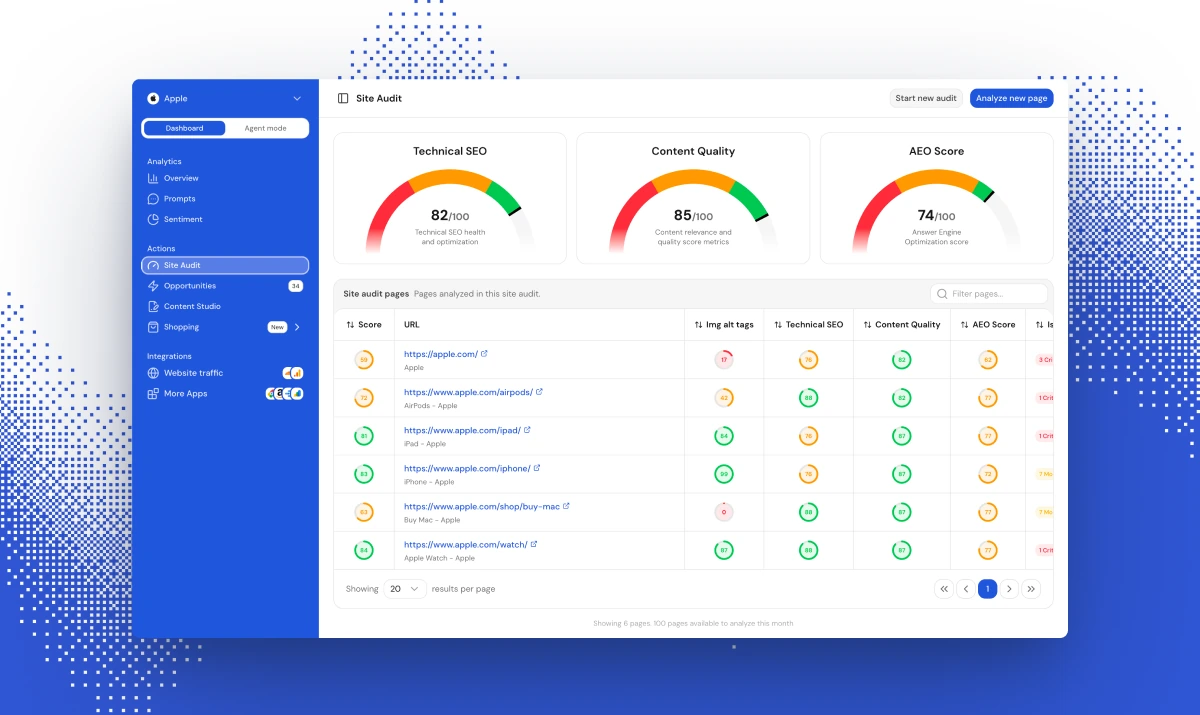
Site Audit comes first, because there's no point writing new content while your existing pages have problems that keep AI from citing them. Every page gets three scores: Technical SEO, Content Quality, and AEO, which measures how well-suited a page is to being quoted or cited in an AI answer. Fix critical issues first. And start with the pages that already drive AI-relevant citations rather than your highest-traffic pages overall, because a page that's already close to being cited is a much shorter path to a win than a blank one.
Content Studio comes second. You pick a content type (comparison, guide, FAQ, category description), then choose which prompts and topics the piece should target. Ranketta pulls in the top citations AI already trusts for those prompts and the top query-fanouts it actually searches for, so the draft gets built around the questions being asked rather than the ones you assume are being asked. The editor keeps you in the loop the whole way. You get an outline and a draft to shape, not finished AI text to paste and pray.
The mental shift this enables is the whole point. The old question was "should we write another article about this topic?" The better question is: which tracked prompt are we losing right now, and what source would a model need to see to answer it in our favor?
If you run a store: fix the catalogue
For a store, the content path above still applies, but the bigger lever usually sits in the Shopping module, because AI shopping agents only recommend products they can confidently identify, price, and route a buyer to.
My Products shows you where to start. Your catalogue, ranked by how ready each product is for AI agents. Weak titles, missing GTINs, and thin descriptions surface here as low-readiness products, not as a vague feeling that the feed could be better.
Proposals does the fixing. AI suggests improvements to titles, descriptions, categories, GTINs and other attributes, and every suggestion comes with a confidence score. You approve or reject them one by one, or set an auto-approval threshold in Settings and let the high-confidence fixes flow through on their own. Ten SKUs or ten thousand, same workflow.
Channels closes the loop. The improved catalogue publishes back to Google Merchant Center, Amazon, Heureka, and Zboží, either as a feed URL or a direct, always-in-sync connection. This is the step that makes the whole thing matter: a fixed product that never leaves Ranketta doesn't change what any AI agent sees.
The store version of the mental shift: instead of "our feed tool handles the feed," ask which specific products AI keeps skipping, and whether the data those agents read gives them a reason to stop skipping.
6. Let Agent mode do the grunt work
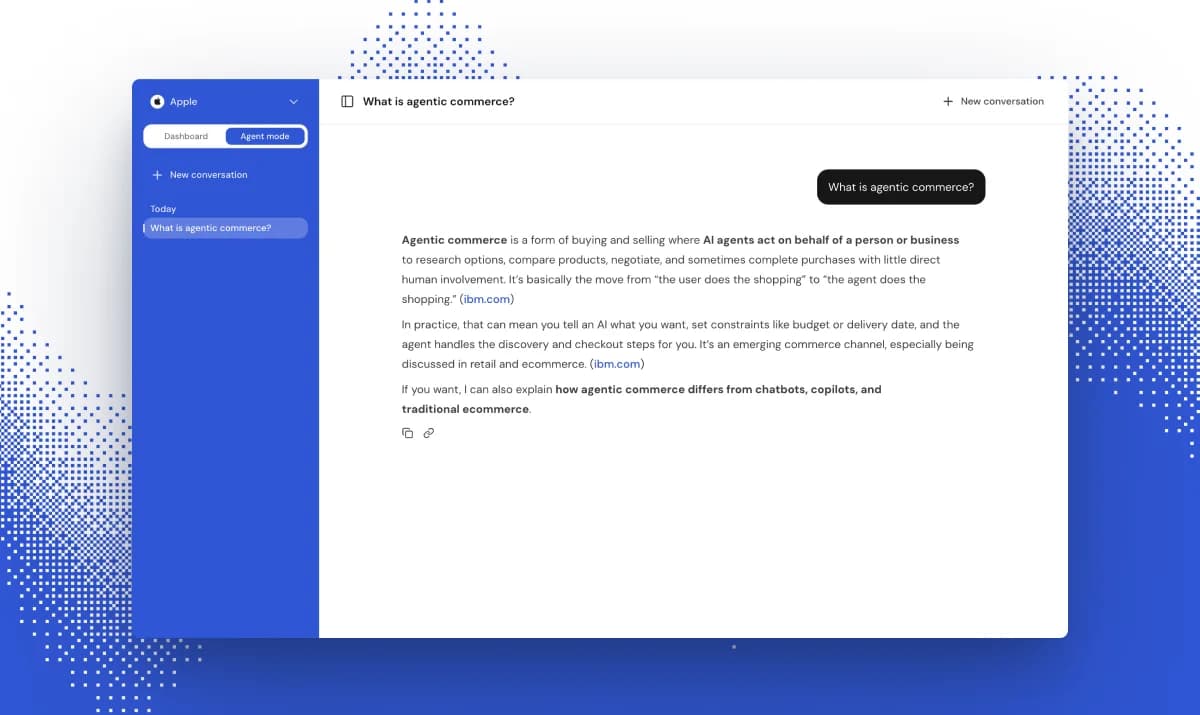
Agent mode is a plain-language way into your own data. Ask it which prompts have the biggest gap against your top competitor, why visibility dropped on a specific prompt, or for a summary of this week's opportunities, and it answers from your actual numbers. It can also mark opportunities for you and start content drafts in Content Studio.
Two honest caveats. Content still goes through you before it's published, which is by design. And marking an opportunity complete doesn't guarantee anything improves; what it does is drop a marker on your charts, so you can see the before and after and judge whether the change moved anything. That's measurement, not magic, and it's more useful that way.
7. Integration options: connect the rest of your stack
Visibility data is most useful sitting next to the numbers your team already looks at, and inside the AI assistants your team already works in.
Google Search Console feeds prompt creation with real keyword demand, so connect it before or alongside your prompt setup rather than after. Google Analytics tracks AI bot sessions and referral sources on the Traffic page, which lets you check whether a visibility change came with an actual traffic change instead of assuming it did. Cloudflare catches AI bot visits at the edge, before requests even reach your server, which covers what analytics scripts can miss. Looker Studio pipes visibility metrics into the dashboards where your revenue and campaign numbers already live, so AI visibility doesn't sit in a tool nobody else opens. And the MCP server connects Ranketta to chatbots and AI assistants directly: prompts, citations, and audits become queryable from Claude, Cursor, or any MCP client, for anyone on the team who'd rather ask their assistant than click through a dashboard.
The short version
Traditional SEO tools show you rankings, backlinks, and traffic. None of that answers the question that matters now: when a buyer asks an AI for a recommendation, do you make the shortlist, and if not, what exactly is holding you back? That's what the loop in this guide is for. Measure, understand, act, check the impact, and let the weekly Opportunities batch keep the whole thing running without anyone needing to remember to check.
If you want a baseline on your own domain first, run the free audit: work email and domain, report in minutes.