




AI traffic analytics counts the visits AI assistants send to your site, and in GA4 that means the AI Assistant channel or a custom channel group. Both undercount AI's real influence. In BuzzStream's study of 12,000 AI answers, only 23.1% of brand mentions came with a citation in the same response. Clicks from Google's AI Overviews and AI Mode are filed under Organic Search, and clicks without a tag or referrer land in Direct. Track the AI channel, but report it as a floor, next to how often AI actually recommends you.
TL;DR
- Most AI recommendations carry no link. Only 23.1% of brand mentions are backed by a citation in the same answer, and 7.2% for "best X" list prompts (BuzzStream, June 2026).
- GA4 has had an AI Assistant channel since May 2026. It excludes Google's AI Overviews and AI Mode, which Google files under Organic Search.
- Clicks without a tag or referrer land in Direct. When ChatGPT links lost their tag for a few days in October 2026, sites saw ChatGPT sessions fall by 22% to 57% while Direct rose.
- Set up a custom AI channel group with a regex anyway. It is the cleanest view of the visits you can see.
- Report AI visibility, position and share of voice as the main trend, and AI referral traffic as a supporting line.
Sometime this week, in a budget meeting, someone will point at a dashboard and say: "AI sends us 2% of traffic. Let's revisit next year."
Here is why that slide is wrong. When an AI assistant names a brand, most of the time there is no link to click. Most recommendations end right there, in the answer, leaving no trace. And many of the clicks that do happen get filed under channels with no AI label on them. The AI line in your analytics is not a measure of AI influence. It is a count of the recommendations that survived every filter on the way to your dashboard.
This article follows one recommendation down that path, filter by filter, shows how to set up the best AI traffic view GA4 allows, and ends with the number worth putting on the slide instead.
Why don't AI recommendations show up as traffic?
Because most of them never carry a link.
Picture the moment that matters. A shopper asks ChatGPT which magnesium to buy, and the answer names three products. Yours is one of them. This is the new shelf, the exact second your brand wins. And in most answers, your name sits there as plain text. Nothing to click. The shopper reads, nods, closes the tab. Your analytics recorded nothing, because there was nothing to record.
How often is "most"? BuzzStream tracked 12,000 answers across Google AI Mode, AI Overviews, Gemini and GPT-5.4-mini and found that only 23.1% of brand mentions are backed by a citation in the same response. Retail sits at 16.5%, among the lowest of the industries it measured. List prompts like "best project management tools", the shape of every shopping shortlist question, drop to 7.2% (June 2026). Other 2026 measurements point the same way. In Semrush's ghost citations study, about a quarter of brand appearances (25.1%) were mentions with no citation (June 2026). In Seer Interactive's analysis of 541,213 answers, a brand that was mentioned got cited in only 53.1% of them (March 2026).
Part of the reason is almost funny: the model often is not even online. A 2025 study of about 14,000 real conversations with search-enabled AI systems on LMArena found that 34% of Gemini and 24% of GPT-4o answers were generated without explicitly fetching any web content (Strauss, Yang, O'Reilly et al., June 2025). The model answered from memory. There was never a link to give you.
Where do the clicks that do happen end up?
Often somewhere you would never look for them.
Suppose the shopper does click. If the answer came from Google's AI Overviews or AI Mode, the click lands in Organic Search. That is by design: Google's GA4 documentation defines Organic Search as including "Google's AI Overviews and AI Mode", and says the AI Assistant channel excludes them. The largest AI surface your customers use is folded into ordinary search clicks, and no setting will unfold it.
GA4 added the AI Assistant channel in May 2026, and it helps. But watch the definition move. The launch note named "chatbots like ChatGPT, Gemini, and Claude." Today's channel definition names "ChatGPT, Gemini, Deepseek, Copilot, or Grok." The rule matches against a list of AI assistants that the help page does not reproduce. Your AI traffic line can rise or fall because someone edited a list you have no easy way to check.
And when a click arrives with neither a tag nor a referrer, it lands in Direct. October 2026 showed how fast that happens. For a few days, ChatGPT opened links in its answers without the utm_source=chatgpt.com tag and without a referrer. Sites tracked by Graphite saw ChatGPT sessions in the AI Assistant channel fall by 22% to 57%, and an Adobe analyst comparing about 500 pages saw ChatGPT visits drop by roughly 31,000 a day while Direct rose by roughly 26,000 (Search Engine Journal, 15 October 2026). The shoppers did not stop coming. The label fell off. OpenAI treated it as a bug and the tags came back, but the same visits can lose their label any time a link is opened without them.
How do you track AI traffic in GA4?
Use the default AI Assistant channel, add a custom channel group for full control, and keep a regex exploration for history. Then write down what none of them can see.
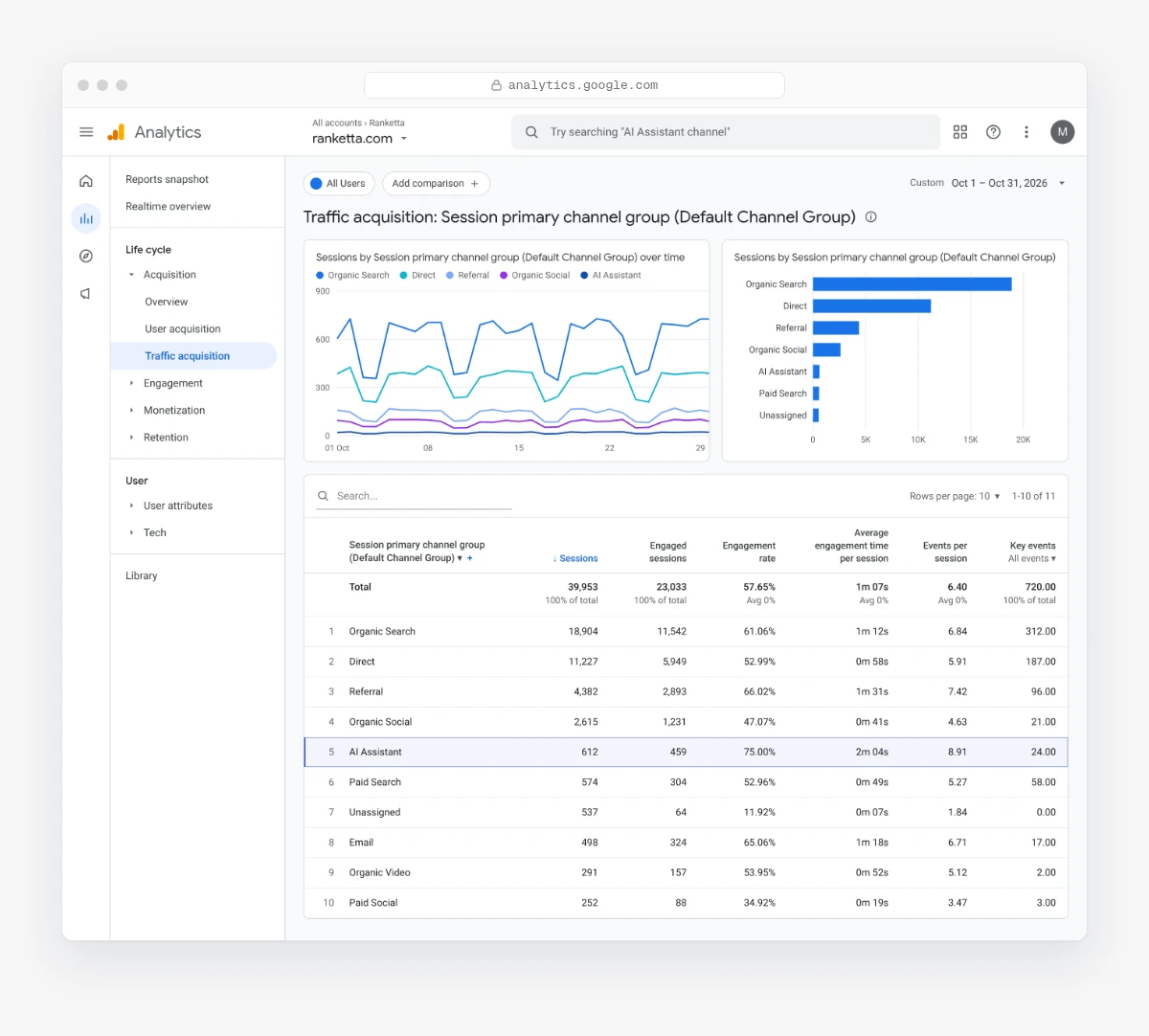
- Check the AI Assistant channel. In Reports > Acquisition > Traffic acquisition, set the dimension to Session primary channel group and look for AI Assistant. GA4 assigns it when the referrer matches a recognised AI assistant, with the medium
ai-assistant. It needs no setup, but you cannot edit the list behind it.
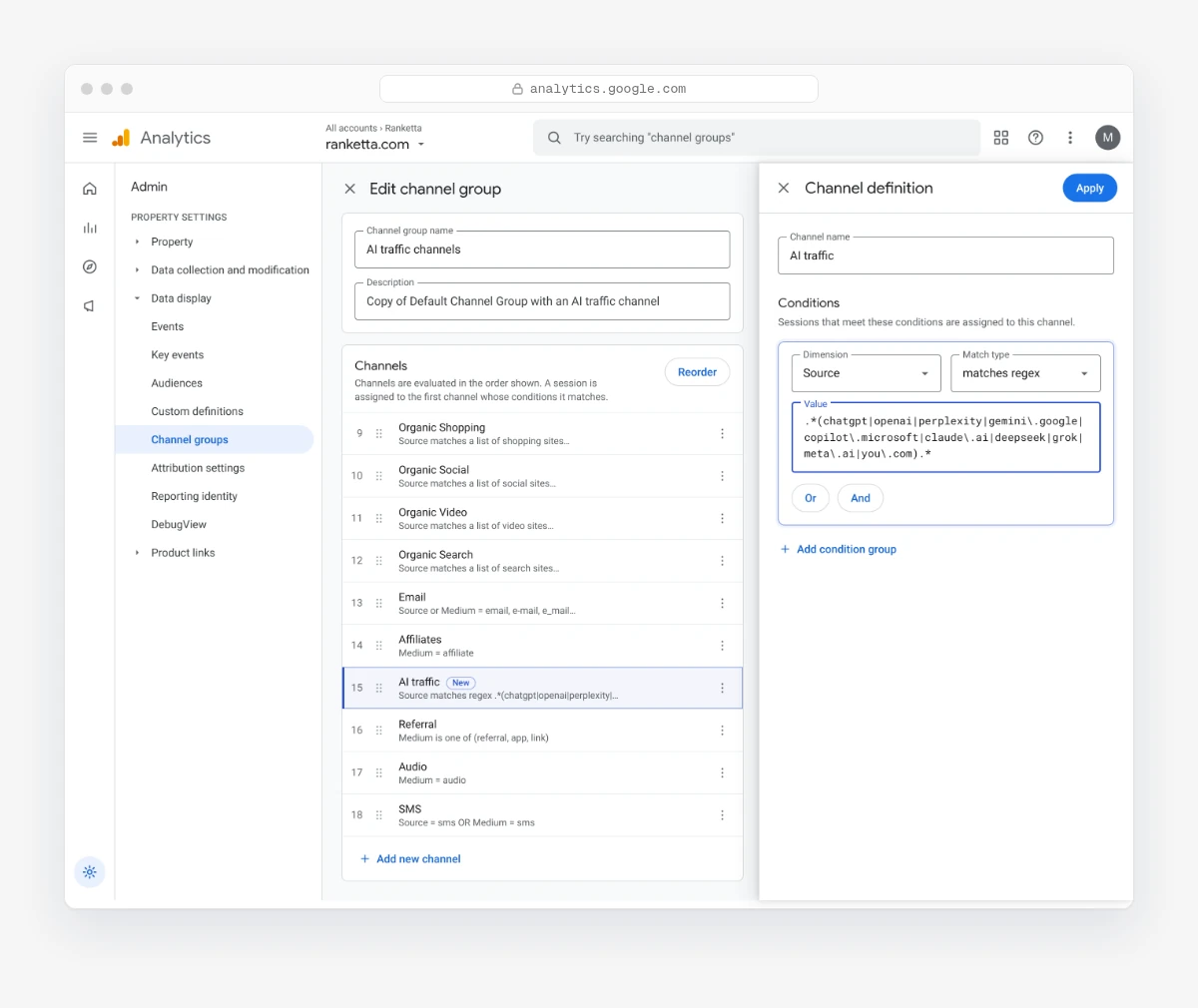
- Create a custom channel group. In Admin > Data display > Channel groups, copy the default group, add a channel called "AI traffic" with the condition Source matches regex, and move it above Referral so the visits are not claimed by Referral first. A starting regex:
.*(chatgpt|openai|perplexity|gemini\.google|copilot\.microsoft|claude\.ai|deepseek|grok|meta\.ai|you\.com).*Add sources as they appear in your Referral report, and check for new ones monthly, because the list changes faster than any guide.
- Use an exploration for detail and history. In Explore > Free form, put Session source / medium and Landing page in rows, filter Session source / medium with the same regex, and add your key events. This shows which pages AI sends people to and whether they convert.
- Watch Direct to deep pages. Direct sessions that land on a product or blog page, not your homepage, are rarely typed from memory. A rise there after you appear more often in AI answers is a signal worth checking. It is a heuristic, not a measurement.
- Write down what stays invisible. AI Overviews and AI Mode clicks (Organic Search), answers with no link, and shoppers who open a new tab and search your name. Put this note next to the AI line on every report.
GA4 sees the visits that arrive. To see AI agents and assistants reaching the site at the edge, before analytics tags fire, Ranketta's AI traffic attribution logs those visits and sets them against your AI visibility trend.
What do shoppers do with an AI recommendation?
Mostly what you would do: they go check it.
Think of the last time an AI recommended you something that cost real money. Did you buy it from inside the answer? Or did you open a new tab and search for the name, the reviews, the price? CI&T reports that 68% of UK and Ireland shoppers have already used an AI agent when shopping, and the top three uses are comparing brands (45%), finding the lowest price (42%) and finding where specific items can be bought (39%) (July 2026). Three verification tasks.
In our reading of that data (CI&T does not draw this conclusion), verification is the quiet killer of attribution: a new tab, a new query, a new session with somebody else's name on it. The customer AI convinced shows up in your dashboard as a customer some other channel delivered. The demand does not disappear. It arrives later, unlabelled.
So what does your AI traffic number actually measure?
Follow one recommendation all the way down. First it needs a link; most never get one. Then it needs a click on that link, not a new tab; many shoppers open the new tab. Then the click needs to be filed as AI; AI Overviews and AI Mode clicks are not, and untagged clicks are not.
What is left at the bottom is your AI traffic number: the share of recommendations that survived every filter. A survival rate, not an influence measure. A perfectly accurate answer to a question nobody was asking.
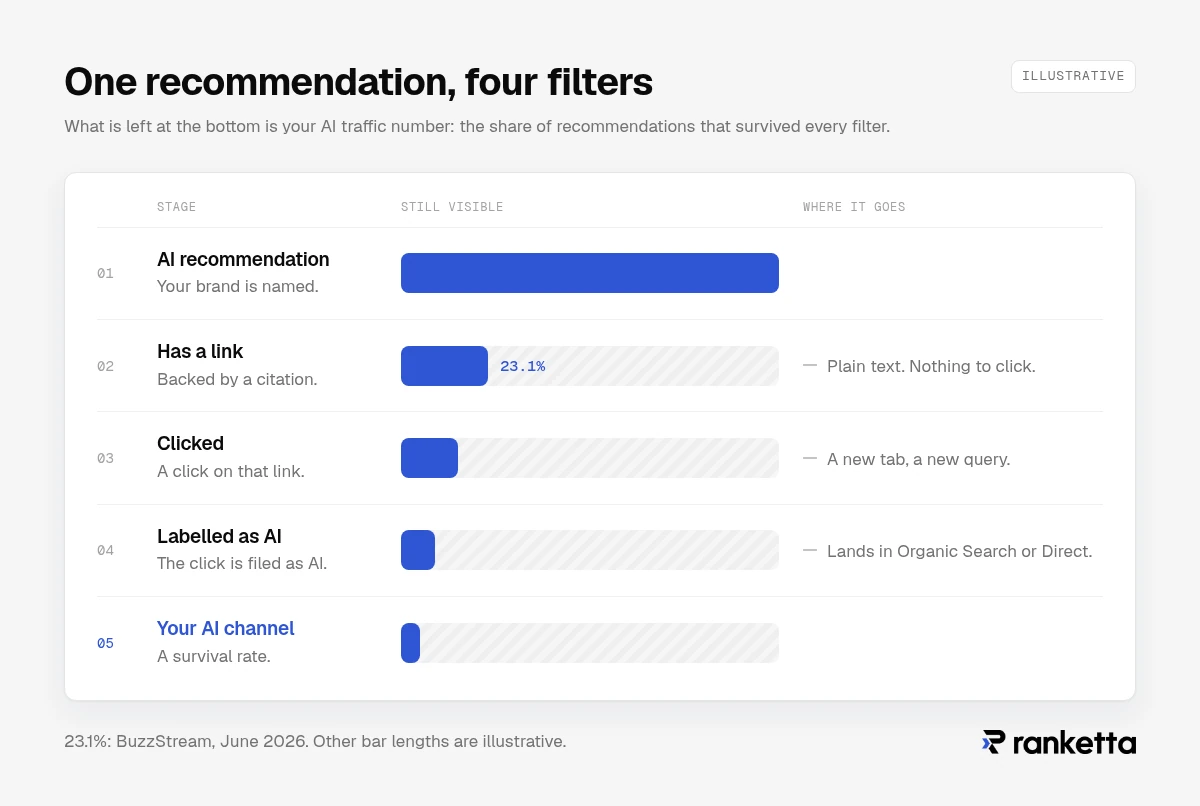
So when someone says "AI is 2% of our traffic," the honest reply is: 2% is how many customers AI sent us by the one path we can see. It says nothing about how many customers AI convinced. Treat every analytics-based AI number, ours included, as a floor, not the size of the channel.
How big is the gap between influence and measurement?
Ask people, and the influence looks enormous. McKinsey's "New front door to the internet" (October 2025) reports that half of consumers already use AI-powered search, that around 40 to 55% of consumers in top sectors such as consumer electronics, grocery, travel, wellness, apparel, beauty and financial services use it, and that 44% of AI search users call it their primary and preferred source, ahead of traditional search at 31% (US survey of 1,927 consumers, August 2025). McKinsey projects that $750 billion of US revenue will flow through AI-powered search by 2028.
Ask the dashboards, and it looks negligible. Previsible analyzed 6.77 million LLM-driven sessions across 166 GA4 properties and found that AI referrals stay under 2% of total sessions in every industry it reported (July 2026).
Half of consumers searching with AI. Fewer than two sessions in a hundred wearing the label. Both numbers are real. They measure different events: the first counts who asks, the second counts who left a trace your analytics can read.
The size of what is missing comes from the measurement side itself. Previsible excluded Google's AI Overviews from its dataset, and its author, David Bell, writes that AI discovery inside Google's results "almost certainly represents a larger volume of AI-driven traffic than all standalone LLM platforms combined." If that holds, AI-touched clicks are more than double what your AI channel shows, before counting the untagged clicks sitting in Direct. That is not our estimate. It follows from the author of one of the largest public datasets on the subject.
What should you report instead?
The number that survives all of this is presence in the answer itself. It does not care whether a link existed, whether the shopper clicked it, or how a channel grouping filed it. It was there at the moment the recommendation happened, which is the moment everything else in this article loses sight of.
Measured properly, it means the share of answers your products appear in, over repeated runs, per product and per AI engine you track. One check is an anecdote; the same question produces different answers hours apart. Percentages over many runs hold still.
So next Monday, put three trends on the slide instead of one traffic line: AI visibility (the share of answers you appear in), average position in the answer, and share of voice against the products recommended next to yours. Keep AI referral traffic from the GA4 setup above as a supporting line. It is real, just late and partial. And when the numbers move week to week, the sentence for your CEO: the answer is assembled fresh every time, so we track the share, not the screenshot.
How we run those measurements, and what we give up doing it this way, is documented in how Ranketta measures AI visibility.